
Applies to: Billing
Three settings on the expense form affect the money: Markup Ratio, Reimbursable, and Taxable. Here's when to use each one and how the math works.
Markup: Charging More Than You Paid
Markup is the percentage you add on top of what you paid. Enter it in Markup Ratio and the total updates as you type.
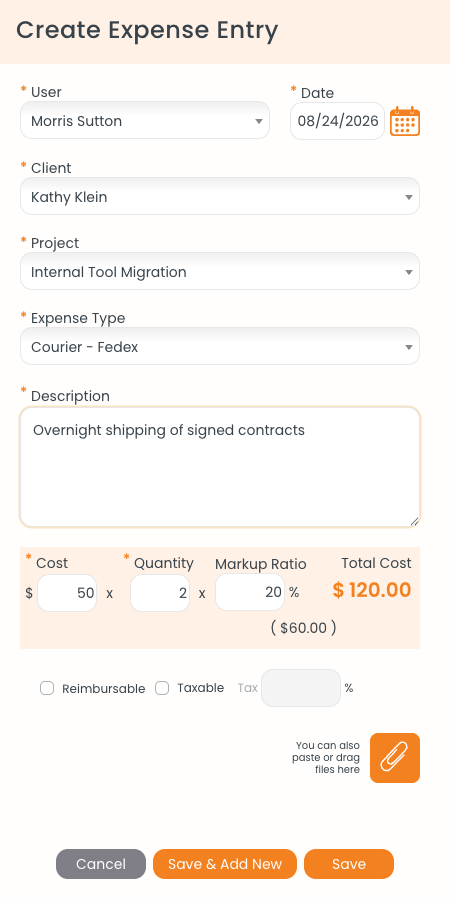
$50.00 × 2 with 20% markup gives $120.00. The $60.00 in parentheses is the marked-up unit rate.
Say you pay $50.00 each for two overnight couriers and add 20% markup:
- Cost $50.00 × Quantity 2 × Markup 20% = Total Cost $120.00
- The marked-up unit rate in parentheses is $60.00 ($50.00 plus 20%)
- On the invoice, the client sees quantity 2 at $60.00 = $120.00
- Your margin is the $20.00 difference
Reimbursable: Paying Someone Back
Tick Reimbursable when the person who paid should get the money back from the firm. It flags the expense for repayment. It doesn't change what the client is charged.
Taxable: Adding Tax on the Invoice
Tick Taxable when tax should be added to this expense on the invoice, and enter the percentage in the Tax field beside it. To skip typing it each time, set a default tax rate for the expense type in Settings > Customize > Custom Lists. See Editing Custom Lists: Activities, Expense Types, and More.