
Applies to: Billing
Paid for something on a client's behalf, like a courier, a filing fee, or printing? Record it as an expense. It shows up with your time when you build the client's next invoice, so nothing gets forgotten.
Adding an Expense
- Click + Create > Expense Entry, or Create Expense Entry on the Manage Time & Expense Entries page. The form opens in a separate window.
- Check the User and Date.
- Choose the Client, then the Project.
- Choose an Expense Type, such as Courier - Fedex or Copying.
- Enter a Description. The client reads this on the invoice, so be specific.
- Enter the Cost and Quantity, and a Markup Ratio if you charge one.
- Tick Reimbursable and Taxable if they apply. See Expense Markup, Reimbursable, and Taxable Explained.
- Attach the receipt, then click Save.
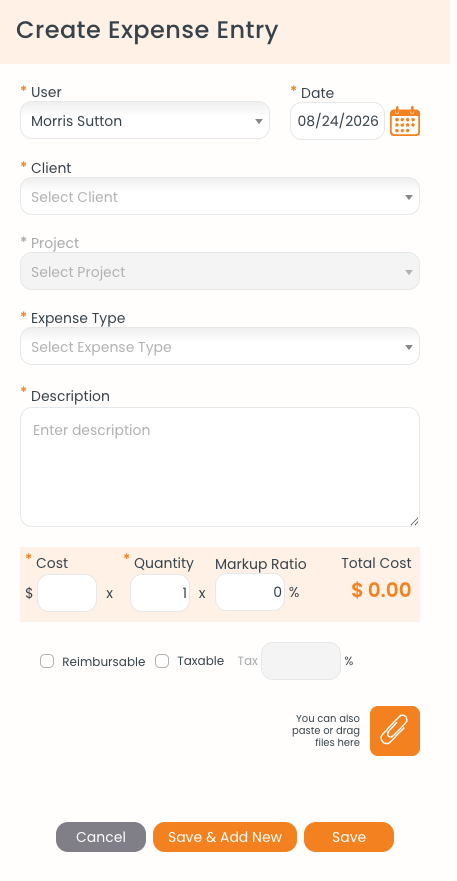
The Create Expense Entry form. Cost, quantity, and markup are worked out on the highlighted row.
Attaching a Receipt
Click the paperclip at the bottom of the form to pick a file, or paste or drag the file onto that area. Attaching it now is much easier than hunting for it at month end.
Setting Up Expense Types You Use Often
Click Settings > Customize > Custom Lists and click Add Expense. Each type can have a default amount, tax percentage, and reimbursable setting. See Editing Custom Lists: Activities, Expense Types, and More.
What Happens Next
The expense starts as UnBilled. When you build the client's next invoice, it appears in the entry picker under its project's (Expenses) heading. See Creating an Invoice.
Common Problems
- Save doesn’t work. Client, project, expense type, description, cost, and quantity are all required.
- Nothing happens when you click Expense Entry. The form opens in a separate window, so your browser blocked the pop-up. Allow pop-ups for secure.ebillity.com and click again.
- The expense isn’t on the invoice. Check the date range in the entry picker. With All entries up to invoice date, an expense dated after the invoice date won't show.